Active Wear Hybrid
Bloomfield WatchfacesPersonalization
3.78.00 Reviews
- Version
- Varies With Device
- Installs
- 10.00K
- Age Rating
- Everyone
Screenshots
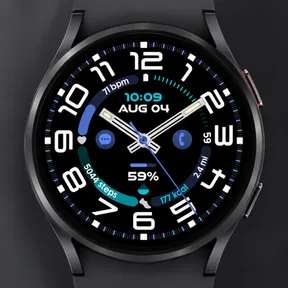
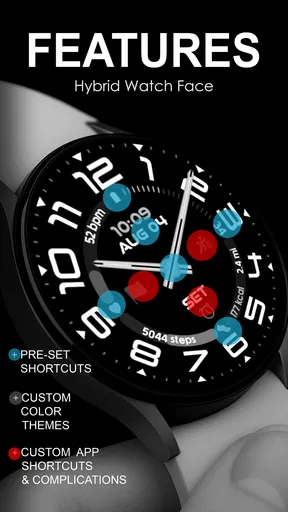
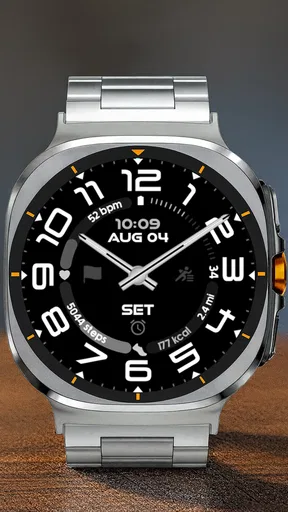
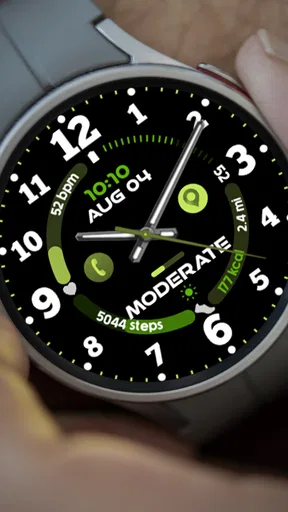
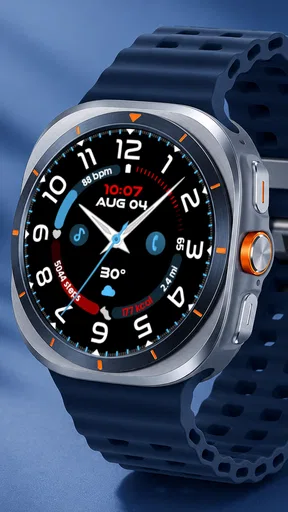
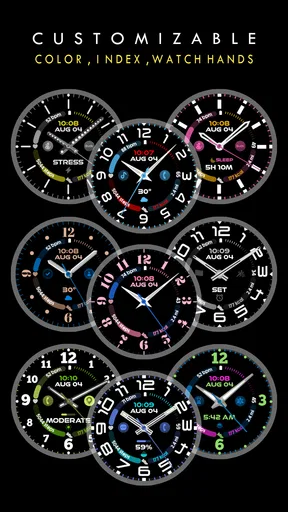
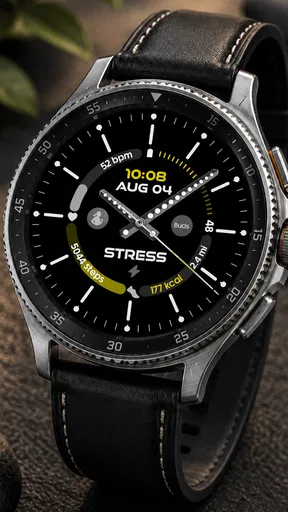
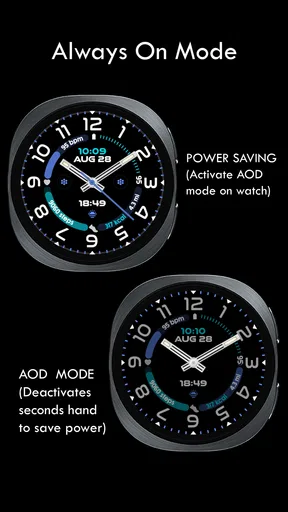
Our Review of Active Wear Hybrid
 Analysis by Appyee
Active Wear Hybrid caught my attention because it approaches watch personalization from a practical angle rather than treating the screen as a miniature poster. It is a Wear OS watch face from Bloomfield Watchfaces, designed for people who want a sporty look that still works with ordinary clothes. After spending time with it, I found the main appeal is its balance: it feels more purposeful than a decorative face, but less visually aggressive than many fitness-focused alternatives.
The app belongs to the personalization category and costs $2.69. That places it in the paid-watch-face space, where the real question is not whether it has a long feature list, but whether you will enjoy seeing the same layout throughout your day. My answer is cautiously positive. It has a clear identity and suits an active routine, although users who expect extensive customization or a dense dashboard may find it restrained.
How the design works in everyday use
The first thing I noticed is the hybrid character of the layout. It aims to combine the visual confidence of an active-wear display with enough polish for work, travel, and casual use. That matters because a watch face can look excellent during a run and strangely out of place at a dinner table. This one is easier to keep on all day.
In the morning, I can imagine using it as a quick-glance surface while getting ready: time first, supporting information arranged around it, and no need to open a separate app for every small check. During a commute, the same design feels readable without demanding attention for more than a moment. Later, when changing into exercise clothes, it does not require a complete visual reset. That continuity is the strongest reason to choose it over a purely athletic face.
The short description, “Active Wear Hybrid,” is a fair summary of the intended mood, but it does not fully explain the design decision. This is not simply a digital stopwatch placed on a wrist. The styling tries to make activity-related information feel at home in a general-purpose watch face. I found that more useful than an exaggerated sports theme, especially for someone whose day alternates between desk time, errands, and movement.
There is also a psychological advantage to a face that does not look tied to one workout. If I leave it installed, I am more likely to keep the same glance habits from one context to another. That makes the watch feel consistent rather than like a collection of separate modes. The trade-off is that the design may not satisfy someone who wants a dramatic transformation every time they start training.
Readability before decoration
Active Wear Hybrid works best when treated as an information tool with style, not as a piece of digital artwork. Its visual direction is confident, but the useful test is whether the important elements remain understandable while walking, standing in sunlight, or checking the wrist with one hand occupied. A face that looks impressive in a store preview can become tiring when every glance requires concentration.
My preference is to judge it at the distance where I normally read a watch, not with the wrist held close to the face. At that distance, the hybrid approach makes sense: the active character gives the display structure, while the more polished presentation keeps it from feeling like equipment reserved for the gym. If you prefer oversized numerals and almost no secondary information, a simpler face will probably be more comfortable.
The same principle applies at night. A busy face can become distracting in a dark bedroom or during a late cinema visit. Before committing to it as a permanent choice, I would test its low-light behavior on the particular watch being used and decide whether the visual density feels calm enough. That is not a criticism unique to this design; it is an important consideration whenever a face is built around activity and information.
Where it fits better than the usual alternatives
The usual alternatives fall into two groups. Minimal faces offer a quiet time display and very little else, while fitness-oriented faces often prioritize measurements, rings, and technical cues. Active Wear Hybrid sits between them. It is a better match than a minimalist face if I want my watch to feel useful during an active day, but a better match than a technical dashboard if I still care about clothing and setting.
That middle position is also its limitation. A dedicated training face may be more efficient when I am actively monitoring a workout. A clean analog-style option may be more elegant for formal occasions. Choosing this app means accepting a consistent compromise instead of optimizing the watch for one narrow situation.
I would recommend it most strongly to someone who wants one dependable face for the whole day. It makes less sense for a collector who changes faces frequently, or for a user who expects every visual element to be redesigned through deep controls. The purchase is easier to justify when the hybrid style already matches your taste, because no amount of extra information can compensate for disliking the basic arrangement.
Trust, controls, and making a careful choice
Trust is worth considering with any wearable personalization app because a watch sits close to personal routines. In this case, I would evaluate the installation screen and the watch’s own permission prompts before accepting anything. The important habit is simple: read each request in context, allow only what is necessary for the experience you want, and revisit those choices later if your use changes.
I do not treat a polished appearance as proof of good data practices, and I would not assume that a watch face is automatically harmless just because it is small. The responsible approach is to inspect the permissions shown by the device and the controls available through the operating system. If a prompt is unclear, I would pause rather than approve it automatically. That gives the user a concrete way to keep control without relying on guesswork.
The same caution applies to account decisions. If installation, purchase management, or restoration involves the relevant app store account, I would use the normal account settings to review subscriptions, payment history, and connected devices. A one-time purchase should still be treated as an account transaction that the user can inspect. Keeping those records separate from the watch itself makes future device changes less stressful.
Because the app is rated for Everyone, it is presented as suitable for a broad audience. I still think adults should configure the watch with younger users rather than handing over every approval screen. The age label is useful context, but it does not replace checking what appears during setup or deciding which device permissions fit the household’s comfort level.
Small choices that improve the experience
My first practical tip is to install it when you have time to test it, not immediately before leaving for work or starting exercise. Watch-face setup can involve choosing the face, checking how it sits on the wrist, and deciding whether the information is comfortable at a glance. A rushed installation makes it harder to distinguish a design issue from a setup issue.
My second tip is to compare it with your current face for a full day rather than judging it after one minute. Notice how often you look at the display, whether you instinctively search for a particular area, and whether the active styling still feels right during quiet periods. The most useful face is usually the one that reduces friction in repeated moments, not the one that looks most exciting on first opening.
A third useful workflow is to keep a simpler alternative available for specific situations. I would use Active Wear Hybrid as the everyday option, then switch to a calmer face for formal events or late-night use if needed. That does not weaken the purchase; it recognizes that no single layout is ideal for every environment. The hybrid design earns its place by covering many situations well, not by replacing every possible style.
Finally, review the watch’s controls after a software or device change. Wearable settings can move, and a choice that felt appropriate on one watch may not feel identical on another. Rechecking permissions and visible user options is a better practice than assuming the previous configuration carried over exactly as expected.
Who should choose it, and who should pass
I think Active Wear Hybrid is a good fit for an Android or Wear OS user who wants an active-looking face without making the wrist look like a dedicated training instrument. It is especially appealing if you walk, commute, exercise casually, or simply prefer sporty styling in daily life. The price is modest enough to make experimentation reasonable, but I would still buy it for the design rather than for the hope of unlocking an entirely different product later.
I would skip it if your priority is maximum simplicity. Someone who wants only a large time display and no visual competition may be happier with a minimalist alternative. I would also look elsewhere if my main goal were serious workout analysis, because a specialized fitness face is likely to communicate that purpose more directly.
It may also be the wrong choice for users who change watch faces according to mood. Paying for a face that stays installed only briefly is poor value, even when the price is reasonable. Conversely, someone who dislikes changing settings and wants a reliable default may appreciate the hybrid styling precisely because it can move between everyday contexts.
The developer, Bloomfield Watchfaces, has positioned this release as a focused personalization product rather than a broad lifestyle platform. That focus is reassuring in one sense: I know what I am evaluating. It also means expectations should remain realistic. The value comes from the face’s visual balance, glanceability, and fit with a routine, not from imagining features that are not part of the experience.
What the store response suggests
The app has reached over ten thousand installs, with an average rating of 3.7 from 79 ratings and eight written reviews. Those figures suggest real interest, but not universal agreement. I read that as a reason to be selective rather than suspicious: watch-face preferences are unusually personal, and a design that feels perfectly balanced to one person can feel crowded or too sporty to another.
The release date of January 17, 2025 also places it among relatively recent personalization options. That makes it worth checking how well it behaves on your own watch and current software rather than assuming every model will present it identically. Hardware size, screen shape, brightness, and wrist habits can all change the impression of the same design.
Before buying, I would ask myself three practical questions. Will I keep this face on for most of the day? Do I genuinely prefer active styling to a neutral or classic look? Am I comfortable reviewing the device’s permission prompts and account controls during setup? If the answer to all three is yes, the purchase has a clear rationale. If the answer to the first is no, even a well-made face is unlikely to feel worthwhile.
My final impression
Active Wear Hybrid is strongest as an everyday compromise. It gives the wrist a purposeful, energetic appearance while avoiding the feeling that I am wearing a piece of workout equipment during every other part of the day. That is a specific strength, and it is more meaningful than a generic promise of style.
I would recommend it to friends who want a sporty face that can survive a mixed schedule, provided they are comfortable with its visual personality. I would not recommend it to someone seeking a minimalist display, a formal classic, or a specialized training dashboard. The paid price is reasonable for a face you will use repeatedly, but only if the hybrid look already appeals to you.
My cautious verdict is positive: try it when you want one active-minded design for commuting, casual exercise, errands, and ordinary workdays. Install it deliberately, inspect the visible controls, test it across different lighting and clothing situations, and keep a simpler alternative for moments when restraint matters more. With those expectations, Bloomfield Watchfaces’ release feels like a thoughtful personalization choice rather than a face trying to be everything at once.
Verdict
Strengths of Active Wear Hybrid
- Combines smartwatch features with a traditional analog watch design.
- Tracks daily activity, workouts, steps, and sleep in one device.
- Discreet appearance suits both casual and formal outfits.
- Provides smartphone notifications without a full touchscreen interface.
- Longer battery life than many fully digital smartwatches.
Limitations of Active Wear Hybrid
- Limited app ecosystem compared with Apple Watch or Wear OS devices.
- Small display can make notifications and data harder to read.
- Some features may require the companion app to work properly.
- Fitness tracking may be less detailed than dedicated sports watches.
- Hybrid controls can take time to learn for first-time users.
Similar Picks in This Category
View All
Microsoft SwiftKey AI Keyboard
SwiftKey4.3

Wallpapers
Google LLC4.1

Zedge™ Wallpapers & Ringtones
Zedge4.7

Yandex Browser with Alice AI
Direct Cursus Computer Systems Trading LLC4.3

Ringtone Maker:create ringtone
Big Bang Inc.4.7

Fonts Keyboard
Fonts Keyboard3.9
Frequently Asked Questions
What is Active Wear Hybrid?
Active Wear Hybrid is a companion app designed for compatible hybrid smartwatches and wearable devices. It typically connects the watch to an Android or iPhone through Bluetooth, allowing users to review activity data, configure watch settings, receive notifications, and access health or fitness features. The exact functions available may depend on the watch model, phone permissions, and the operating system being used.
Which devices and phones are compatible with Active Wear Hybrid?
Compatibility can vary depending on the specific Active Wear Hybrid watch and the version of the app. In general, the application is intended for supported Android smartphones and iPhones with Bluetooth enabled. Before downloading, users should check the app store listing and the manufacturer’s compatibility information, because older phones, unsupported operating-system versions, or certain watch models may not provide full access to all features.
What can I do with Active Wear Hybrid after connecting my watch?
After pairing a compatible device, Active Wear Hybrid may let you synchronize steps, distance, calories, sleep information, workouts, and other available measurements. It can also provide options for setting alarms, changing watch faces, managing notifications, and adjusting preferences. The experience is mainly intended for everyday tracking and convenience, although the available tools can differ according to the connected hybrid watch.
Does Active Wear Hybrid require Bluetooth, location, or other permissions?
Yes, the app generally needs Bluetooth access to communicate with the hybrid watch and synchronize information. Depending on the phone platform and app version, it may also request notification, location, motion, health, or background activity permissions. Some permissions are necessary for reliable synchronization and alerts, while others may support optional features. Review each request carefully and enable only what you are comfortable using.
Is Active Wear Hybrid a medical or highly accurate fitness application?
Active Wear Hybrid should be viewed as a companion and lifestyle-tracking application rather than a medical device. Data such as steps, sleep, calories, heart rate, or activity duration can be useful for general awareness, but readings may vary because of device placement, movement, battery level, and sensor limitations. It should not replace professional medical advice, diagnosis, or treatment, especially when monitoring a health condition.
